
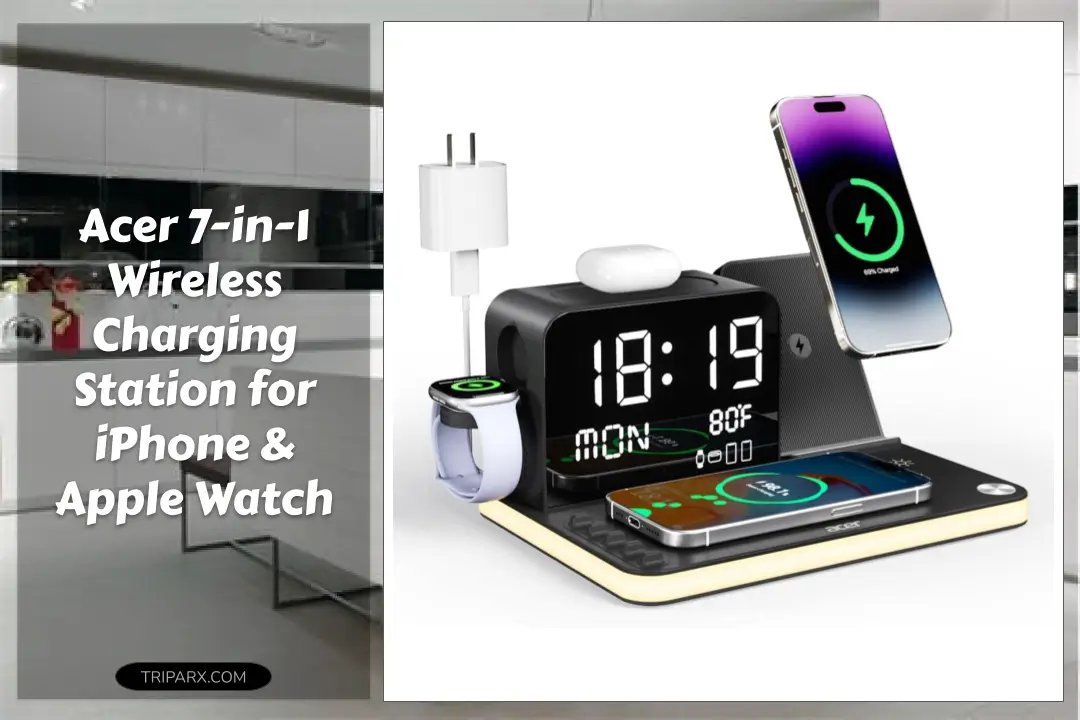

The acer 7-in-1 wireless charging station replaces a tangle of cords with a single dock that can charge up to six devices at once. If you own an iPhone, Apple Watch, and AirPods, that alone can shave minutes off daily frustrations and clear your nightstand in one move.
You probably own at least 3 charging cables and a charger brick that lives under the pile. The mistake is thinking one more cable will fix it. This 7-in-1 setup uses a 30W adapter for fast simultaneous charging and folds phone, earbuds, watch, and two wired ports into one compact stand – but note case thickness should be less than 2mm for wireless charging to work reliably. Ready to ditch the cable chaos?

Who This Is For
Short version: people who want fewer cords and faster reloads. Ideal scenarios include:
- Multi-device households with iPhone 16/15/14/13/12 Pro Max and AirPods users who need an organized nightstand.
- Home office setups where desk space and cable management matter.
- Travelers who pack a single 30W adapter and want a compact stand for hotels.
It might not be right for someone using thick protective cases over 2mm or those who prefer separate chargers for each device.
Key Features & Real-World Use
- 7-in-1 layout – Two wireless phone chargers, a wireless earbuds pad, an Apple Watch dock, plus USB-A and USB-C wired ports give flexible form factors for bedside or desk.
- 30W adapter support – Engineered for faster simultaneous charging when paired with a compatible power brick.
- Compatibility – Works with recent iPhone models and Apple Watch units; good for AirPods and other wireless earbuds that support Qi charging.
- Case-friendly note – Wireless pads work best with cases under 2mm; thin cases and silicone sleeves are recommended.
- Daily convenience – Cuts down on USB cables, improves cable management, and keeps charging coils aligned thanks to its upright stand design.

How to Choose
Use these quick criteria to decide if this dock matches your needs:
- Device mix – If you own multiple Apple devices (iPhone, Apple Watch, AirPods), a 7-in-1 dock consolidates chargers.
- Power needs – Look for a 30W adapter to unlock faster simultaneous charging; lower-watt adapters may slow top-up speeds.
- Port flexibility – Want wired charging for a tablet or laptop phone? The USB-C and USB-A ports add versatility.
- Placement – Pick a model that fits your nightstand, office desk, or entryway; compact vertical stands save surface area.

From Box to Daily Use
- Unpack and place the stand on a flat surface near your 30W adapter or power source.
- Connect the USB-C input to your adapter, and route any wired cords to the USB-A or USB-C ports as needed.
- Position your iPhone and wireless earbuds on their designated pads, keeping cases below 2mm thickness.
- Dock your Apple Watch on the watch cradle and confirm the LED or charge indicator on your devices.
- Use the stand daily to reduce cable clutter; wipe connectors occasionally to maintain good contact.
Buyer Doubts Solved
Worried about compatibility? The dock supports recent iPhone models and standard Qi-charging earbuds, plus wired charging via USB-A and USB-C for non-wireless devices.
Concerned about heat or safety? Use the recommended 30W adapter and keep the stand ventilated on a desk or nightstand to avoid blocking airflow.
Think it will be bulky? The vertical stand design saves surface area and improves ergonomics when checking notifications while charging.
Not sure if it replaces your existing chargers? If you want less cable clutter and faster simultaneous charging for multiple Apple devices, it does that job well.

Consolidating chargers into one Acer dock clears clutter, speeds daily top-ups with a 30W adapter, and keeps your iPhone, Apple Watch, and earbuds organized on a single stand. If you value neat cable management and faster simultaneous charging, this is a practical upgrade.
Some links are affiliate. As an Amazon Associate, I earn from qualifying purchases – at no extra cost to you. It helps keep these finds coming. Thanks for your support!